- 1SYNTH
- 2T2
- 3SHIFT
2.5.1 scale mode introduction
type: keyboard locked to a scale · by maiko
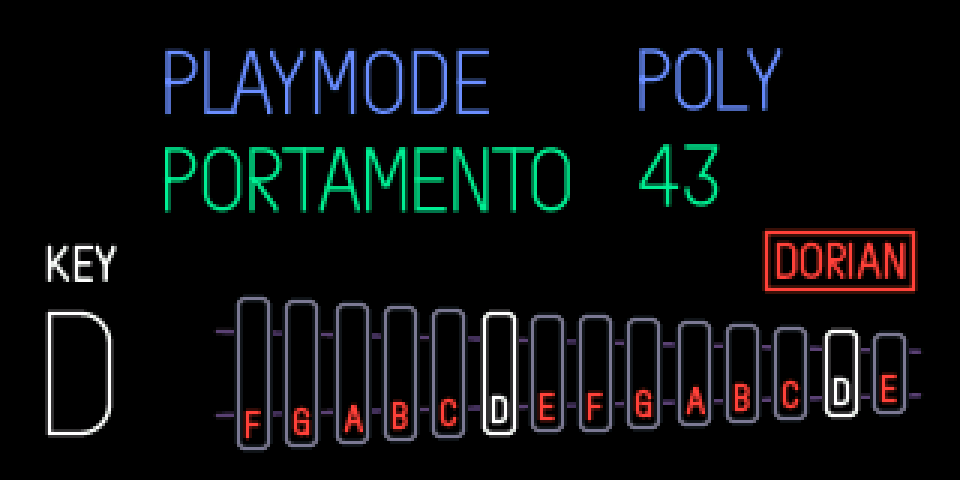
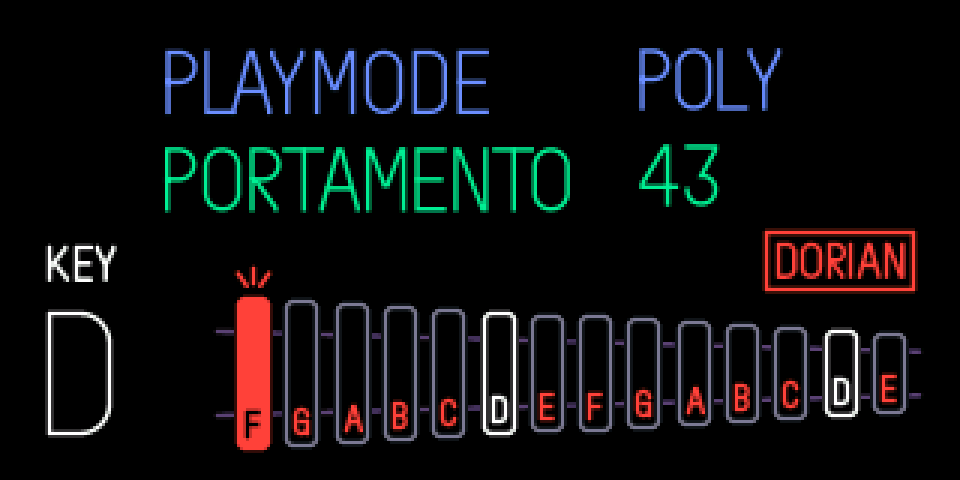
Locks the keyboard to a scale so you can't hit a wrong note. With a scale on, the 14 white keys play the scale's notes in order and the black keys go silent.
The panel is a glockenspiel: one bar per white key, with the note it now plays. The root's bars are white. A bar lights up when you play it.
New engines are in the engine list: SYNTH, then SHIFT + T1. They come without presets, so they have no folder in the sound browser (SHIFT + 1 … 8): look in SHIFT + T1.
2.5.2 opening scale mode
step 1
SYNTH
step 2
T2
step 3
SHIFT
SYNTH, press T2, then hold SHIFT. The panel shows under PLAYMODE and PORTAMENTO.
2.5.3 knobs
turn (shift held)
blue
playmode, as before
green
portamento, as before
white
key (root): c to b
orange
scale
2.5.4 scales
Orange goes: off, major, dorian, phrygian, lydian, mixolydian, minor, locrian, harmonic minor, melodic minor.
No key moves more than a whole tone from its usual note. C major is the white keys as they are. Off is the normal keyboard, black keys included.
2.5.5 tips
- One setting for every synth sound. It stays on after power off.
- Drum sounds are never changed.
- Changing the scale while holding notes is safe: each key releases the note it started.
- Release SHIFT before playing: SHIFT + white keys are the euclid and dots shortcuts.