- 1SYNTH / DRUM
- 21 … 8
4.1.1 snapshot naming introduction
type: name a snapshot when you save it · by maiko
Saving a snapshot opens a naming screen instead of using the date as the name. The name is written on a tape between two reels; the letters are below, in four rows.
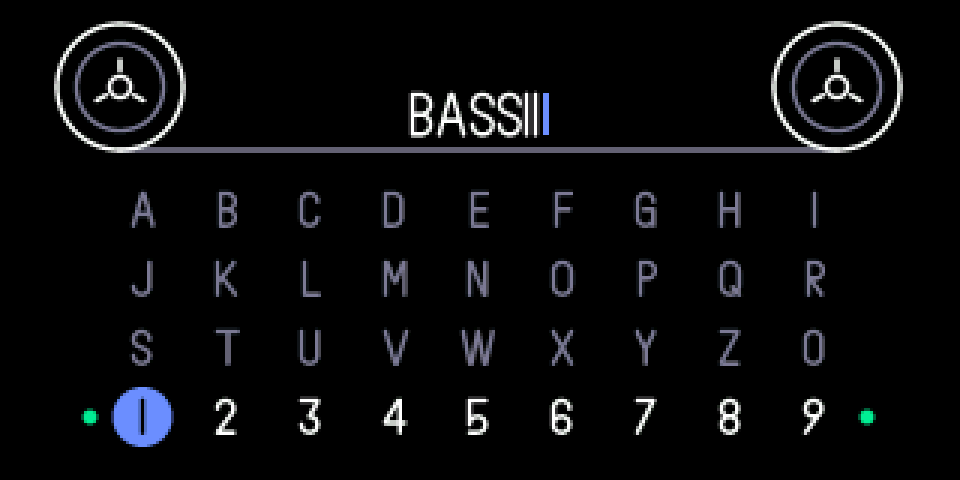
4.1.2 opening snapshot naming
/
step 1
SYNTH / DRUM
step 2
1 … 8
SYNTH or DRUM. Hold a sound key (1 … 8) to save, as usual. When the countdown ends the naming screen opens.
4.1.3 knobs
turn
blue
move along the letters
green
row up / down
white
—
orange
—
press
blue
type the letter
green
—
white
—
orange
—
4.1.4 keys
←
delete the last letter
the same sound key
save under the typed name (nothing typed: the usual date name)
///
SYNTH / DRUM / TAPE / MIXER
save under the usual date name
4.1.5 tips
- Up to 12 letters: a to z and 0 to 9. In the OP-1's font 1 and i look the same.
- Your snapshots are in the sound browser (SHIFT + sound key), in the snapshot folder.
- Existing snapshots can't be renamed.