- 1SHIFT + COM
- 2blue
8.1.1 file introduction
type: what's using your storage · by maiko
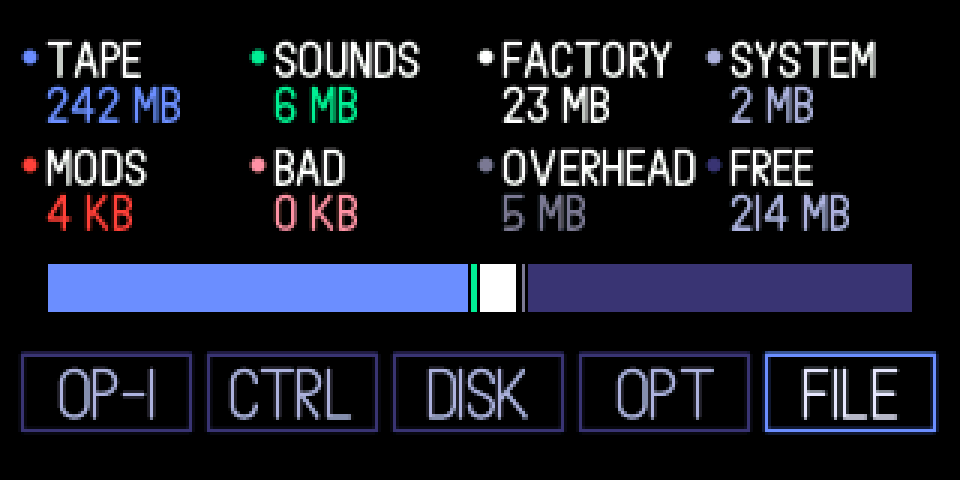
A fifth box on the COM screen that shows where the OP-1's storage goes, with a bar split into parts.
8.1.2 opening file
step 1
SHIFT + COM
step 2
blue
SHIFT + COM, then turn the blue knob to FILE.
8.1.3 knobs
turn
blue
move between OP-1, CTRL, DISK, OPT, FILE
green
—
white
—
orange
—
press
blue
open CTRL or DISK; on OPT: usb charging on / off; on FILE: the flash check
green
—
white
—
orange
—
8.1.4 keys
T1 … T4
OP-1, CTRL, DISK, OPT, as before
8.1.5 the parts
tape: the recorded part of every tape. sounds: your synth and drum sounds and snapshots. factory: TE's content. system: the firmware copy and databases. mods: this firmware's files (the undo history, settings and logs). bad: storage the OP-1 has retired as bad; before #250 a bug in TE's firmware retired good blocks too, and they stay counted here until a format (see the flash check). overhead: the file system's own bookkeeping. free: what's left.
8.1.6 tips
- OP-1, OPT and FILE open as soon as the knob lands on them; CTRL and DISK only light up until you press the knob.
- Lots of bad? #250 stops it growing; the flash check page says how to get it back.