- 1SHIFT + SEQ
- 2blue
7.1.1 euclid introduction
type: six euclidean rhythms · by pcppcp / op1r ↗
Six slots, each playing one note in a euclidean rhythm. You set how many steps the loop has and how many of them play; euclid spreads the hits as evenly as it can.
New sequencers are in the sequencer list: SHIFT + SEQ. Both work for synths and drums, run at the OP-1's tempo and have six slots that play at the same time. Their settings are saved.
7.1.2 opening euclid
step 1
SHIFT + SEQ
step 2
blue
SHIFT + SEQ, then turn blue to EUCLID.
7.1.3 knobs
turn
blue
steps
green
pulses (hits)
white
rotation
orange
start / stop the slot
page 2 (press the knob)
blue
rate: 1/4 … 1/32, triplets
green
gate (note length)
white
octave
orange
level (velocity)
7.1.4 keys
SHIFT + white knob
select the slot (1 … 6)
a note key
give the selected slot that note, at the current octave
SHIFT + orange knob
start / stop all slots
SHIFT + C#
start all slots, or stop them if any is running (any screen)
hold REC + SHIFT + C#
tape armed: start the slots and recording together, from the first step
SHIFT + F G A B
pattern 1 … 4 (the first four white keys, any screen)
SHIFT + G A B C D E
mute / unmute slot 1 … 6 (the last six white keys, any screen)
SHIFT + D#
mute / unmute all
LIFT / DROP / SCISSORS
copy / paste / cut the slot; with SHIFT the whole pattern
← / →
keyboard octave, as usual
7.1.5 how a euclidean rhythm works
Steps is the length of the loop, pulses is how many of those steps play. Euclid spaces the pulses as evenly as the steps allow. Even splits give straight beats; uneven ones give the off-kilter grooves found in a lot of world music.
Rotation turns the pattern around the ring, so the same rhythm starts on a different step. Use it to move a slot against the others.
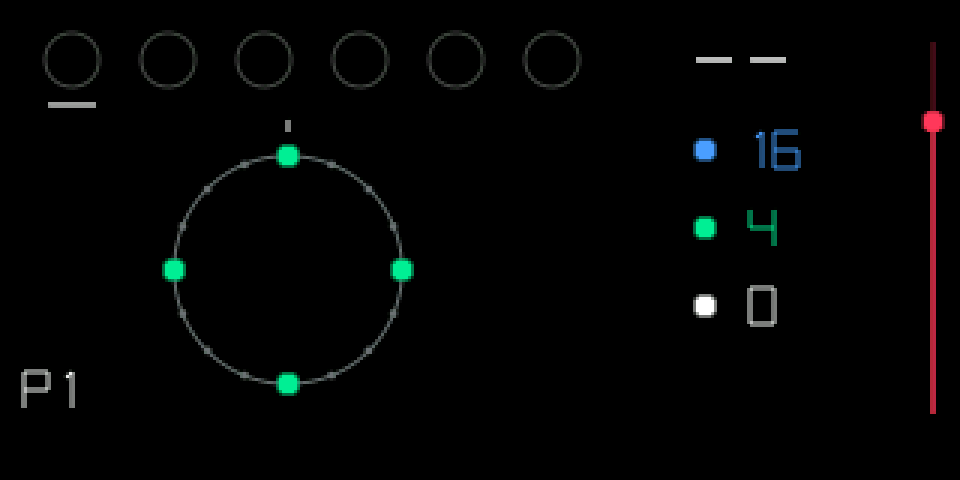
The big ring is the selected slot, its green dots are the pulses. The six small rings at the top are the slots; a red dot in the middle means the slot is playing. The red bar on the right is the slot's level.
16 steps, 4 pulses
8 steps, 3 pulses
8 steps, 5 pulses
7.1.6 tips
- Try one drum per slot: kick on 16/4, snare on 16/2 rotated by 4, hats on 16/11.
- Different step counts per slot (16, 12, 7 …) drift against each other and make long, changing patterns.
- A pattern holds every slot's note, settings and mutes. Which slots are playing stays the same when you switch, and switching is instant, so patterns work like song parts. P1 … P4 is shown bottom left.
- A muted slot keeps running (its dots dim) and comes back in time.
- A slot without a note runs silently, and plays once you switch to a pattern that has a note there.
- Euclid plays several notes at once and sends them over MIDI too. Slots come back stopped after power off.